





Neighbourly New Year Tip #10 - Save posts
Have you spotted a post on Neighbourly you want to refer back to later? It's easy to save posts such as a recommendation for a good plumber or restaurant, something you're thinking of buying or a poll you'd like to track.
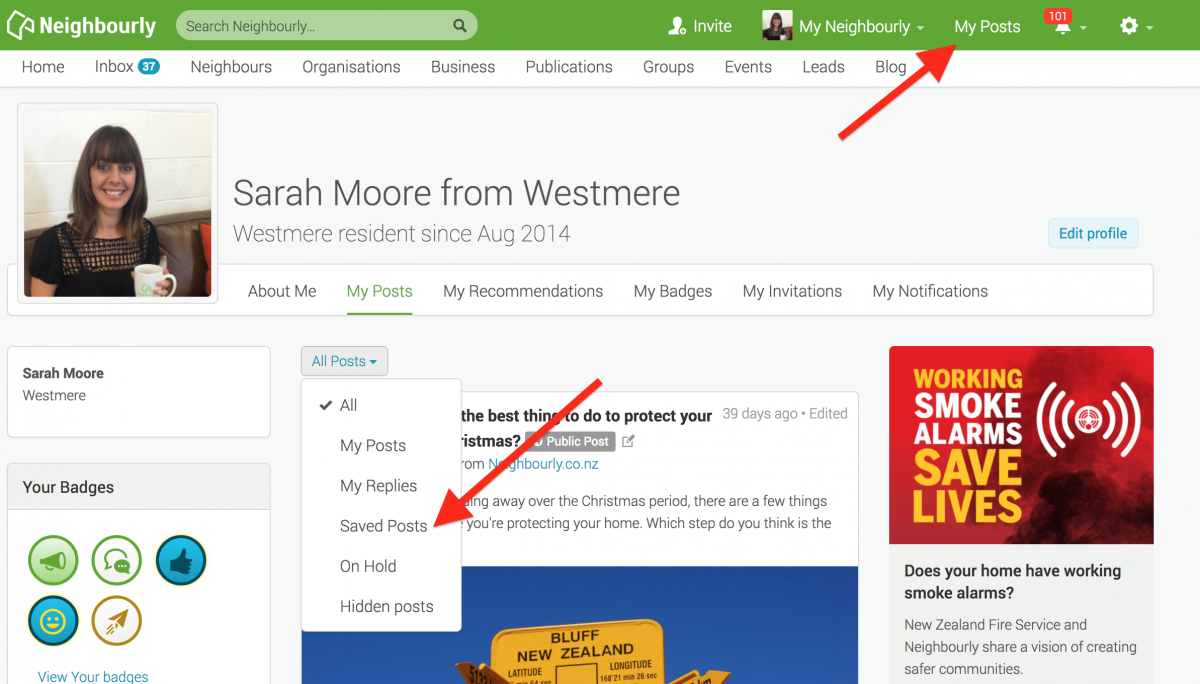
Here's how to save and find posts:
1) Simply click on the SAVE button at the bottom right of a post you want to locate later. The button will change to 'Saved!'
2) To find the post, click on My Posts in the top green navigation bar (on desktop) and click on the All Posts dropdown menu. You'll see the option 'Saved Posts'
3) When you no longer need a record of the post, just click on the Saved button and it will disappear from your Saved list.
Poll: Do you set New Year’s resolutions?
🎉 2026 is almost here!
We’re curious ... how do you welcome it?
Do you set resolutions, follow special traditions, or just go with the flow?

-
9% Yes! New Year, New Me
-
21.9% Yes - but I rarely stick to them
-
69.1% Nah - not for me

Possessions sold as one lot
Morning everyone 😊
I am wanting to sell our mother's possessions as one lot and not individually; ive heard there are people who do this. .
Does anyone know of someone or where I might start?
Shame on You!
This is what greeted workers at Brookfield Sallies yesterday morning. All of it looks like it should have gone straight to the tip, which is what the Sallies will now have to pay to do. Surely whoever does this has no conscience. The Sallies do an amazing job of helping people in times of need and they don't need to be spending any money they receive on doing your dirty work, especially at this time of year.

 Loading…