





Neighbourly New Year Tip #10 - Save posts
Have you spotted a post on Neighbourly you want to refer back to later? It's easy to save posts such as a recommendation for a good plumber or restaurant, something you're thinking of buying or a poll you'd like to track.
Here's how to save and find posts:
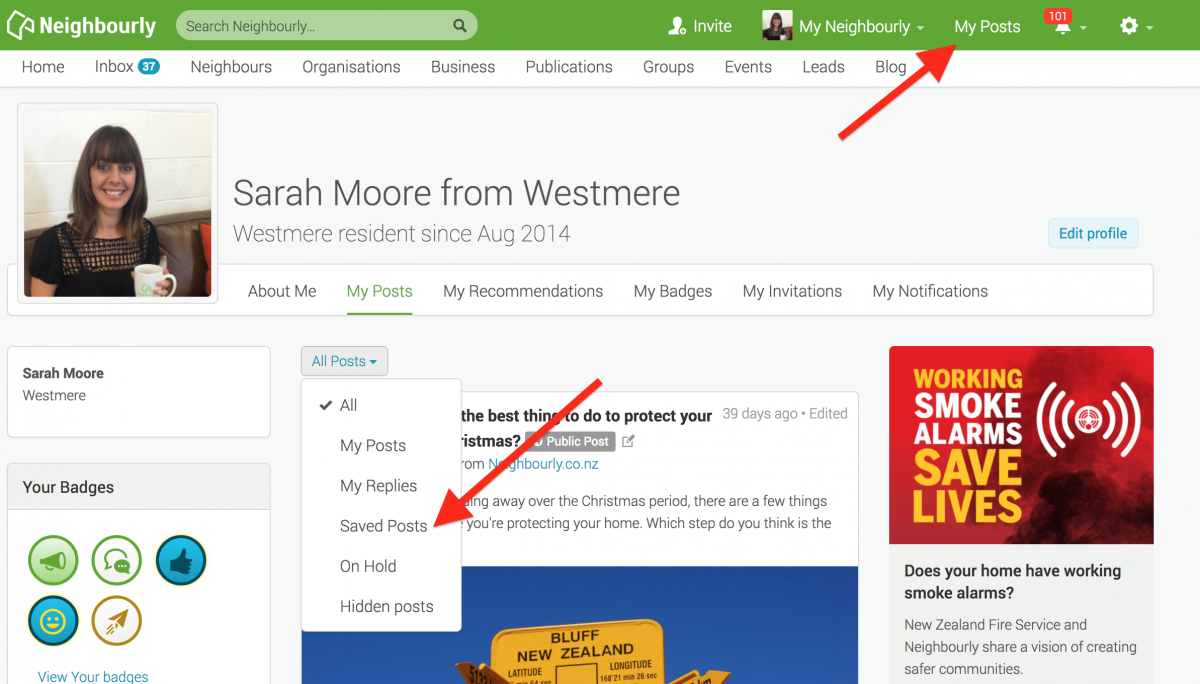
1) Simply click on the SAVE button at the bottom right of a post you want to locate later. The button will change to 'Saved!'
2) To find the post, click on My Posts in the top green navigation bar (on desktop) and click on the All Posts dropdown menu. You'll see the option 'Saved Posts'
3) When you no longer need a record of the post, just click on the Saved button and it will disappear from your Saved list.

Neighbourhood Challenge: Who Can Crack This One? ⛓️💥❔
What has a head but no brain?
Do you think you know the answer? Simply 'Like' this post if you know the answer and the big reveal will be posted in the comments at 2pm on the day!
Want to stop seeing these in your newsfeed?
Head here and hover on the Following button on the top right of the page (and it will show Unfollow) and then click it. If it is giving you the option to Follow, then you've successfully unfollowed the Riddles page.
Poll: Is it ok to regift something that you have been given?
🎁 Holiday Gift Chat!
Do you ever regift?
What’s your take on asking for a receipt if a gift doesn’t fit?

-
77.9% Yes! It's better to regift what I don't need
-
22.1% No. It's the thought and effort that matters

Calling all those in Wheelchairs
Hi, I'm Simon .... a 44 yr old wheelchair user who wants to meet others in a similar position as myself (particularly a woman). I've been a sole parent now for almost 18 years and my son has just left the nest, so I thought it was time to start on the next stage of my life. I have cerebral palsy that effects just my legs (kinda the reason I can't walk) sooooooo if any of you are interested in getting to know me, flick me a message. I enjoy spending time with my son when he comes to visit and my pets (1 cat and 2 birds), I also enjoy building computers as well as a bit of gaming/watching TV too. So if this sounds like something you'd be interested in, shoot me a message.
 Loading…