





Neighbourly Tip #2 - Those three little dots...
Have you noticed those three little dots under Neighbourly posts and replies? Have you ever clicked them?
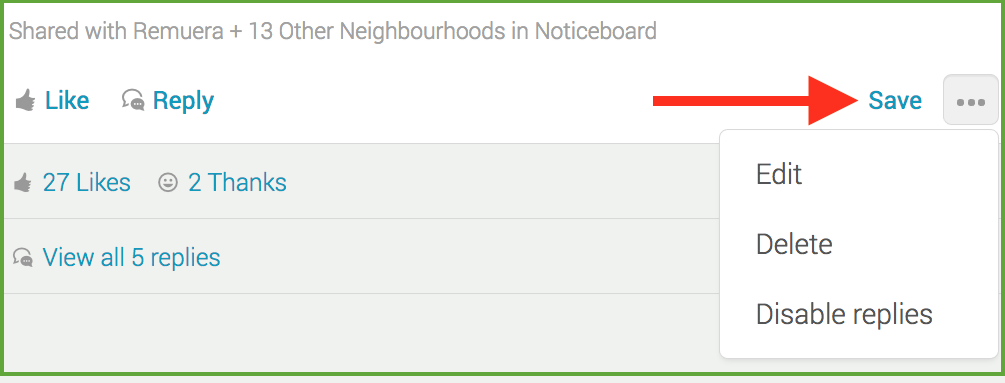
Those three dots bring up a special menu allowing you to hide a post you don't want to see anymore, unfollow a discussion you've taken part in and to report a message for the Neighbourly team to review.
Under your own posts, those three little dots give you a different menu. You'll be able to edit your post, delete it or disable replies.

Neighbourhood Challenge: Who Can Crack This One? ⛓️💥❔
What has a head but no brain?
Do you think you know the answer? Simply 'Like' this post if you know the answer and the big reveal will be posted in the comments at 2pm on the day!
Want to stop seeing these in your newsfeed?
Head here and hover on the Following button on the top right of the page (and it will show Unfollow) and then click it. If it is giving you the option to Follow, then you've successfully unfollowed the Riddles page.
Poll: Is it ok to regift something that you have been given?
🎁 Holiday Gift Chat!
Do you ever regift?
What’s your take on asking for a receipt if a gift doesn’t fit?

-
78.2% Yes! It's better to regift what I don't need
-
21.8% No. It's the thought and effort that matters

Police apologise to rest home alleged theft victim after failing to act
Police have apologised to a pensioner who caught a carer-turned-crook allegedly stealing cash, admitting there was more they could have done.
The about-face comes after the Waikato Times revealed the plight of rest home resident Lisa Allen, who set up a hidden-camera, capturing footage that appeared to show the caregiver opening her handbag and taking out a $50 note while the room was unattended.

 Loading…